


Stay: an AI-first dog training app, built with AI
Stay is a free mobile training companion for people who just adopted or are fostering a dog. It turns the first weeks home into short daily lessons, a simple log, streaks, gear recommendations and an AI dog trainer that coaches owners on their practice videos and questions.
I'm a designer, and this project is about design. I used AI as a tool the way any skilled person uses a tool: I knew what good looked like, set the direction, and reviewed every output. The result is a working, clickable front end that shows how a designer can hand developers something far richer than a static Figma file.
The problem
New adopters often feel overwhelmed in the first weeks, and shelters see dogs come back for behavior issues that early, consistent training could prevent. About 1 in 10 adopted pets is no longer in the home six months later (American Humane and PetSmart study, via Smithsonian), and in one shelter study 58.6% of returns were for behavior problems (Dog Welfare Project).
The paid options are expensive and often teach the dog, not the owner. Board-and-train programs run $500 to $3,500 (Dogster), and the dog still comes home to an owner who has to keep the training going for life.
Stay's answer: put the training in the owner's hands, in their own home, five to ten minutes a day, for free, with an AI trainer on call when they get stuck.
1. Naming and logo
I came up with the name Stay on my own. It's the first command many dogs learn, and it's the outcome every shelter wants: the dog stays home.
I sketched the mark by hand, then ran the same brief through ChatGPT, Gemini and Figma Make to compare how each one interpreted it. ChatGPT produced the strongest logo: a leash looped into a heart. That became the final mark, and ChatGPT also made the module illustrations.
Leadership angle: I treated the AI tools like vendors. Same brief, side-by-side review, and the pick was based on quality, not habit.


2. Planning in Claude chat
Before any code, I built the product plan in Claude chat and iterated on it until the scope was tight:
Audience: one busy, first-time adopter or foster with a young or newly arrived dog
Daily loop: open Today, do a 5 to 10 minute lesson, log how it went, keep the streak
MVP scope: dog-only; a Foundations track across six modules; daily log; streaks; gear and a starter kit; challenges; video feedback from volunteer trainers
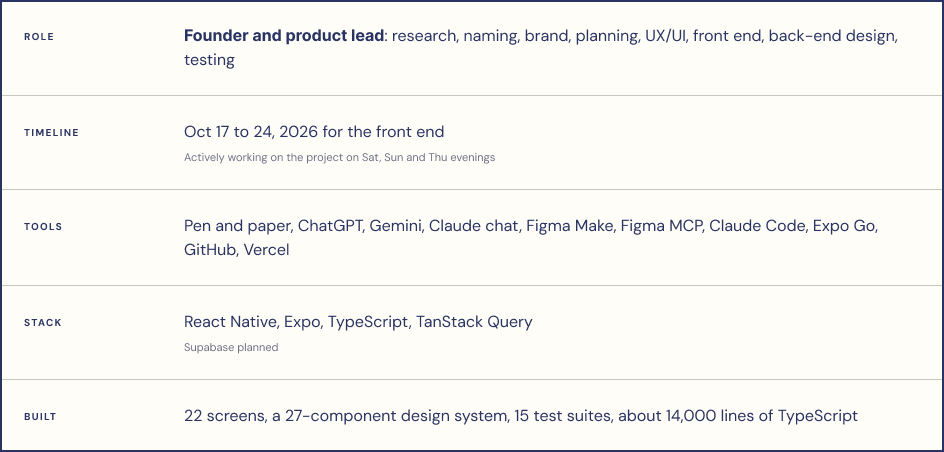
Stack: React Native, Expo and TypeScript, the same technology a production app would use, so developers could build on the prototype instead of starting over
I matched the Claude model to the job: a higher level in plan mode for architecture and decisions, a lighter level for routine build steps. That kept quality high where it mattered without burning through credits.

3. Brand system in Figma Make
To move fast on brand, I gave Figma Make my product brief and asked for three mood board directions. I picked "Field Notes" and had it generate a full component library. See the live Figma Make board.
The system, Field Notes UI v1.0, has a clear point of view: strong corners for action, soft corners for care.
· Palette: field ink, poppy, sprout and sun on warm canvas and paper
· Type: DM Sans, with a Display 40, Heading 24, Body 16 scale
· Shape: square corners and hard offset shadows on actions; rounded corners on caring surfaces
Accessibility built in: 44-point minimum tap targets, no readable text under 11px, reduced-motion support
The palette and button style are shown in the brand board in chapter 1.

4. Connecting design to code
The step that made everything else work: I used the Figma MCP to read the component library into Claude Code, then wrote the whole design system into the project's root instructions file, CLAUDE.md.

Every color, size, radius and spacing value in CLAUDE.md was read from the Figma Make file and mirrored one-to-one in the app's theme. The rules are explicit: build UI only from the component library, never hard-code a value, never redraw the logo. In development the app opens on a design system screen that shows every token and component, so I could check it against Figma side by side.
Leadership angle: set the system before the build, or every screen drifts. This is the same lesson my team learned with Figma Make at work, when it invented its own components instead of using ours.
5. Building the front end, then iterating on the UI
With the plan and the library in place, Claude Code built the MVP in phases against mock data shaped exactly like the future database. Then I iterated on the UI until it matched the brand and the core loop felt fast.

To test it, I ran the app on my own phone in Expo Go, so I could tap through it the way an adopter would instead of clicking around a desktop simulator. Claude Code also wrote unit tests for the core logic (streaks, sizing, next lesson, unlocks) and checked types and linting before calling any phase done.
6. The AI dog trainer
The feature I'm most excited about is an AI trainer. An owner films a practice session or asks a question, and gets coaching back in minutes instead of waiting days for a human expert.
Why AI instead of human trainers
Always available. New owners get stuck at 9pm on a Tuesday, not during business hours.
Free at any scale. A nonprofit can't pay trainers to answer every adopter, but an AI coach costs pennies per conversation.
Personal. It can see the dog's age, size, goal and the lessons they've done, so advice fits this dog, not dogs in general.
What I built
The full owner experience is designed and working in the prototype: send a video or a question, see the status move to "reviewing," get a reply, keep the conversation going, and see unread badges and alerts. In this version the replies are scripted, so I could design and test the whole flow before connecting a model.
Guardrails I designed in from the start:
· It gives training advice, never veterinary advice, and says so.
· Signs of aggression, pain or illness point owners to "When to get help" and their vet.
· It coaches the owner in their own home, which is the whole point of Stay.
What a developer would build next
Connecting a real model to the chat, with the dog's profile and lesson history as context. The prototype already defines the flow, the states, the copy and the guardrails, so that work starts from a clear spec instead of a blank page.
7. A front end built for dev handoff
Stay is a prototype, but it's built the way I'd want a real handoff to work. Instead of a Figma file plus a long spec, a developer gets something they can click, inspect and build against.
What the handoff package includes:

How this would work on a real team
The designer builds the flow in a design-only prototype, using the team's real design system.
The preview link goes to usability testing and stakeholder review before any production code is written.
Developers receive the approved prototype as the spec, then build it properly in the product codebase, with data, security and performance handled by the people who know them best.
My point of view: AI should be a tool for people who already know the craft. I'm not trying to replace developers. I'm trying to give them a clearer, tested starting point, and get the design right before engineering time is spent.
My biggest takeaways
Vibe coding is fun. I didn't expect how much I'd enjoy it. Going from a sketch to something I could tap through on my phone in days brought back the joy of making things.
AI on both sides of the product. I used AI to build Stay, and AI is the product's best idea. Working that way changed how I design: I now ask "what could an AI do for this person?" as early as "what should this screen look like?"
AI is a tool, not a replacement. Every step worked because I knew what good looked like. AI made me faster; it didn't make the design decisions.
Claude Code belongs in corporate UX workflows. Stay convinced me this isn't just a side-project tool. Here's how I'm applying it with my team at work:
· A design-only prototyping repo. Designers build with Claude Code in a separate repo with guardrails, so nothing can reach the production codebase.
· Seeded with the real design system. Tokens and core components go in first, plus a rules file, so Claude Code reuses our parts instead of inventing new ones.
· Preview links for everything. One shareable link per change powers usability studies, stakeholder sign-off and dev handoff.
· Prototype code is a spec, not a pull request. Developers rebuild it properly in the product codebase.
· Fix the foundation in steps. A packaged component library makes every AI tool better, so we pay down that tech debt bit by bit instead of waiting on it.
What I'd tell a team: set the system before the build, pick the model for the job, and review AI output the way you'd review your team's work.
What's next for Stay
· Usability testing with real adopters using the demo link, starting with the daily loop on a phone.
· Partner with developers to turn the prototype into a production app, with the AI trainer as the first feature to build for real.
· Expert review of the lessons, so the AI-generated content gets checked by a professional trainer before launch.
· A 501(c)(3) nonprofit, so Stay stays free for adopters and fosters.
· Later: a shelter-facing side that helps shelters support adopters after the dog goes home.


